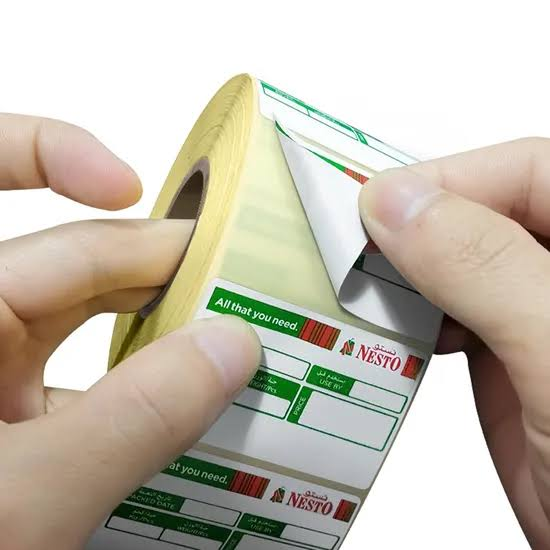
How Do You Choose Direct Thermal Labels for Weigh Scale Printers
A weigh-scale label must fit the printer’s media path and leave enough space for weight, price, product description, and a barcode that scans at checkout. Start with the exact scale model and its approved label dimensions. Then test the final template on actual product packs, because a label that prints neatly can still fold around a tray edge or hide required information.
When comparing weigh scale labels, match the material to the actual surface, printer, handling time, and scan conditions. A familiar size or low roll price does not prove the label will work in the complete workflow.
What the Label Must Accomplish
Retail scales often use die-cut direct thermal rolls with specific gaps, marks, cores, and winding. A roll may be the right width but have the wrong pitch for the scale’s sensor. The label must also suit its display purpose: a deli pack read for one day differs from a chilled package handled repeatedly over a week. Determine the needed information and expected exposure before approving paper, coating, and adhesive.
Choosing the Label Construction
Match label width, length, liner width, gap or mark, core diameter, winding direction, and roll outside diameter to the scale manual. Check whether the printer uses a peel module that needs a particular liner stiffness. Choose an adhesive for the packaging surface: a dry rigid tray, flexible film, and waxy carton behave differently. Do not assume a food-packaging label is approved for direct food contact; confirm any such requirement separately.
Printing and Barcode Setup
Build the template around the longest product name, largest price, and fullest ingredient or handling text that may appear. Keep barcode quiet zones clear of the die-cut edge and avoid shrinking text below practical readability. If the scale calculates variable weight, confirm that the correct encoded format reaches the point-of-sale system. Check print darkness and sensor calibration with the production roll, not a desktop test label.
Application in the Real Workflow
Apply to a dry, flat package area with enough pressure for full contact. Avoid seams, rounded tray corners, and highly textured film. The label location should remain visible in a display case and should not be distorted by wrapping. If packages are cold, application temperature matters; a label pressed onto condensation may lift even when its adhesive is otherwise suitable. Train staff to label consistently so barcode orientation is predictable at checkout.
A Test That Reveals Problems Early
Run a full roll through the scale during a normal production period. Print the longest expected layout and scan it at the point of sale. Apply samples to every major package type, then check them after chilling, display, handling, and customer pickup. Count feed errors and discarded labels, not only first-print quality. Include a package with condensation or grease if those are normal conditions, and document when application must be delayed.
Common Failures and Their Causes
An incorrect gap or black mark can cause skips or partial labels. A small label may force variable-weight barcodes too close to the edge. Labels that stick to a room-temperature test tray may release from chilled film. Another error is buying a roll with too many labels for the scale compartment. Troubleshoot these separately; increasing print heat cannot correct an adhesive or sensor mismatch.
What to Request From a Supplier
Give the converter the scale model, media specification, exact label artwork, package materials, store temperature, and expected label life. Request production-size rolls and confirm the supplier can hold the die-cut pitch needed by the sensor. Use a checkout scan and chilled-package adhesion trial as approval criteria. Keep a physical approved sample so a future substitute is checked against more than a catalogue description.
To order direct thermal labels for this weigh scale labels use case, specify the target surface, label life, printer model, size, core, winding, adhesive, and expected handling. Ask for a converted-roll sample in the proposed construction. The sample should pass the field test outlined above before the full purchase.
How to Prevent Date and Price Mixups at the Scale
The scale’s label is the last visible expression of product data. Keep product lookup codes, price files, and label templates under controlled updates, especially when a store changes promotions or package weight rules. Print a test label after each data update and check price, weight, unit price, and barcode at the register. If the same scale serves several departments, confirm that an operator cannot accidentally choose a similar product with a different date rule. Material selection should support a process that already controls its data.
What to Check After a Label Roll Change
Ask the operator to confirm the roll sits correctly, the sensor finds each gap or mark, and the first label prints in the right place. Scan the first finished pack rather than only the loose label, because folds and condensation appear after application. Record the roll batch if failures start suddenly. A small change in die-cut pitch, liner stiffness, or winding can cause scale jams even when the label face looks identical to the previous supply.
A store should also check the label after a normal refrigerated display interval, not only at the moment of weighing. Condensation and handling can affect adhesion or text. If the product is wrapped in a greasy film, place the label on a clean outer package area rather than trying to make a standard scale adhesive bond to food residue.
How to Decide Whether the Trial Passed
Set the acceptance criteria before testing weigh scale labels. Record feed errors, print clarity, barcode scan rate, application time, edge lift, removal or residue where relevant, and damage after ordinary handling. Use the hardest surface and longest planned dwell period, not only a fresh label under ideal office conditions. If a sample fails, change one factor at a time so the result identifies whether print setup, facestock, adhesive, label geometry, or application method is responsible. Keep the approved sample and settings with the purchasing specification.
Are All Scale Labels Interchangeable
No. Scale printers can differ in sensor type, roll dimensions, winding, liner, peel mechanism, and software layout. Match the exact model’s media requirements and test the full label with the point-of-sale system. Similar-looking rolls may feed or encode differently.